中文 (中国)
 Tiếng Việt
 한국어
한국어
Mastering advanced surface activation technology is remarkably straightforward when utilizing a modern, intuitive touch screen interface. The official COUSZ plasma cleaner manual is meticulously designed to guide your engineering team through every operational phase. From establishing the perfect processing “Recipe” for highly sensitive materials to precisely controlling the RF power output directly from the digital display, this comprehensive guide covers it all. Let us optimize your surface treatment workflow today, guaranteeing absolute adhesion for your printing inks and structural adhesives while keeping your system running smoothly and durably.
1. Important safety instructions and compliance warnings
1.1. General equipment declarations
This official plasma surface treatment machine manual is exclusively intended to instruct factory personnel on how to properly install, calibrate, and operate the COUSZ touch screen series. Enterprise managers must ensure that all operators fully read and comprehend this document prior to initiating the machine. This document acts as a critical component of your industrial equipment; please store it securely for rapid troubleshooting.
Notice: The technical contents of this manual are subject to continuous updates or revisions due to ongoing hardware improvements without prior notice.
1.2. Electrical grounding and high-voltage safety
To safely execute the plasma cleaning machine operating procedures, you must understand that the internal RF generator utilizes exceptionally high voltages. Therefore, the main control cabinet and the spray nozzle head must be perfectly grounded (earthed) utilizing industrial-grade copper wiring. Uncertified personnel are strictly prohibited from opening the chassis or attempting unauthorized repairs.
1.3. Operational safety and environmental hazards
Before engaging the main power switch, the operator must physically verify that the plasma spray gun is tightly secured to the robotic mount and pointed exclusively toward a safe, unoccupied processing zone. Under no circumstances should you simultaneously touch the active plasma plume and the metallic control cabinet.
- High-voltage cable protection: Meticulously protect the thick red high-voltage transmission cable. Strictly avoid mechanical abrasion, sharp bending, or excessive tension. If the outer jacket is torn, immediately halt production.
- Explosion risks: Never operate this high-energy equipment in an enclosed environment containing highly flammable gases, solvent vapors, or combustible airborne dust.
- Ozone ventilation: The ionization of atmospheric air will naturally generate a minor concentration of Ozone. While small amounts provide an antibacterial effect, high concentrations can induce dizziness. Proper factory exhaust ventilation must be installed directly above the processing area.
- Ceramic fragility: The interior core of the plasma spray nozzle contains high-precision ceramic components; strictly avoid blunt force impacts during installation.
Warning regarding electromagnetic interference: The high-frequency RF generator may emit localized electromagnetic interference. When routing external communication cables (like RS485), strictly utilize shielded cables and route them far away from the primary high-voltage and power lines.
2. Detailed touch screen plasma cleaner operation guide
2.1. Navigating the main display interface
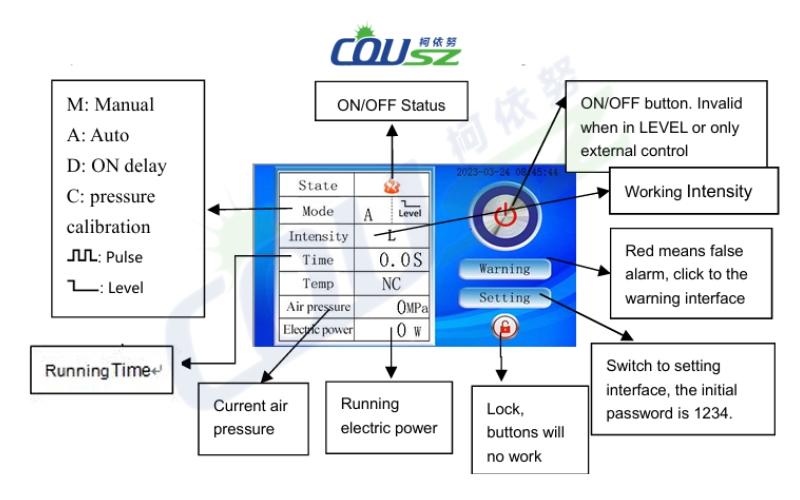
The primary digital interface provides a real-time overview of the machine’s operational status. Understanding this dashboard is the first step in learning how to use a plasma cleaner efficiently. The main screen prominently features three primary interactive buttons: the Power Switch (Toggle On/Off), the Alarm log, and the Settings menu.
2.2. Adjusting the main system settings
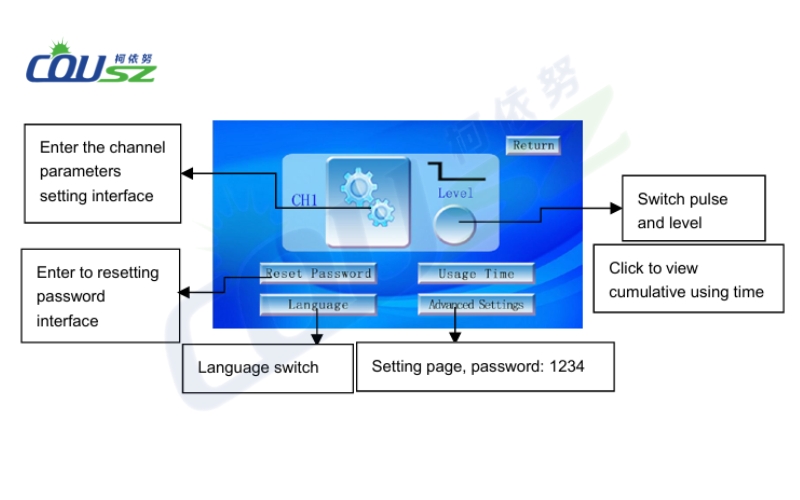
By entering the “Main Settings” page, process engineers can finely tune the core parameters to establish the perfect material recipe:
- Working Mode (Manual vs. Auto): In Manual mode, the operator physically starts and stops the plasma emission. In Auto mode, the machine will automatically extinguish the plasma arc after a pre-set countdown timer expires (this is strictly applicable when using the Pulse activation method).
- Parameter Setup: Allows the user to precisely dial in the plasma Intensity (Wattage) and the Auto Time duration.
- Trigger Method: Choose between “Pulse” (a single trigger signal initiates a timed cycle) or “Level” (the plasma remains active only as long as the trigger signal is continuously held high).
Configuring parameters on the COUSZ plasma surface treatment machine
2.3. Air pressure monitoring interface
The pneumatic gas flow is the lifeblood of the plasma process. This dedicated interface allows the operator to set strict digital safety thresholds for the incoming compressed air. If the factory air supply fluctuates outside these boundaries, the system will trigger a protective alarm.
Note: The absolute upper limit should be set between 0.8 and 1.0 MPa; the lower limit warning should be set between 0 and 0.1 MPa.
2.4. Tracking usage time and maintenance schedules
To ensure unparalleled reliability, the plasma cleaner user manual highly recommends utilizing the “Usage Time” interface. This module tracks the cumulative operating hours of the tungsten electrodes and ceramic nozzles. Factory managers can program custom alerts to notify the maintenance crew exactly when it is time to execute routine preventative maintenance.
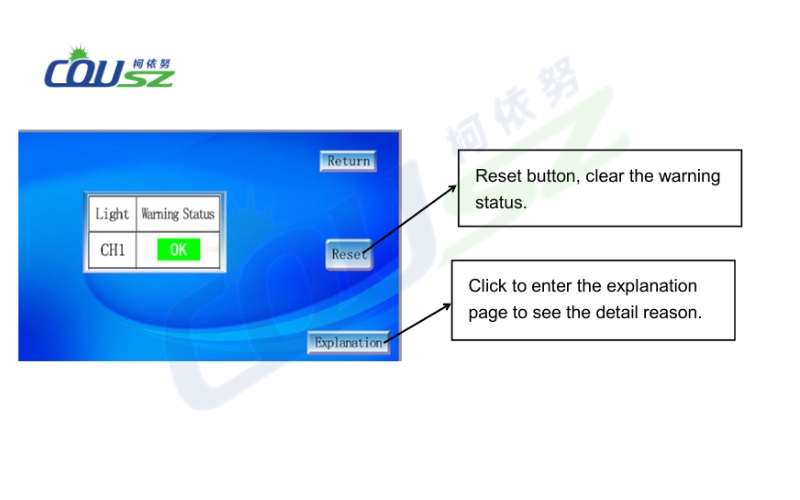
2.5. Understanding the alarm diagnostics page
If the machine encounters a systemic error, it will immediately halt production and log the event here. By clicking the “Explanation” button next to any fault code, the operator can view a detailed, step-by-step diagnostic guide to rapidly resolve the issue and restore the production line.
3. How to operate a plasma cleaner: Setup and troubleshooting
3.1. Standard installation and hardware calibration
To ensure maximum surface energy activation, adhere to the following physical setup procedure:
- Securely mount the plasma spray nozzle onto the automated robotic arm or fixed bracket. Calibrate the Z-axis to ensure the correct working distance (typically 5-15mm) between the nozzle tip and the product surface.
- Connection sequence: Ground the main cabinet -> Ground the spray gun (tighten the connector securely) -> Connect the input compressed air -> Connect the external PLC I/O -> Plug in the main AC power cord (Total Power < 1600W).
- After verifying all connections, toggle the main breaker, adjust the pneumatic pressure to the required level, and press the Start button.
Crucial Warning: Do not aggressively spam the Start/Stop button. Rapid, repetitive cycling will severely damage the high-voltage transformer.
3.2. Recommended air pressure configurations
According to our official plasma machine operating instructions, the input factory air source must be heavily filtered (100% oil-free and moisture-free) providing a stable 0.5MPa – 1.0MPa, with a minimum compressor flow rate of 120 Liters/min. The actual working pressure inside the machine is dictated by the output power:
| Target Output Power Range | Recommended Working Air Pressure |
|---|---|
| 300W – 500W | 0.18 MPa (Allowable range: 0.15 – 0.20 MPa) |
| 500W – 700W | 0.23 MPa (Allowable range: 0.20 – 0.25 MPa) |
| 700W – 1000W | 0.25 MPa (Allowable range: 0.20 – 0.30 MPa) |
3.3. Troubleshooting common industrial faults
If you encounter operational issues while following this plasma cleaner operation guide, refer to the following diagnostic steps:
- Machine suddenly halts during operation: Immediately inspect the high-voltage cable for dangerous electrical leakage and ensure the main factory grounding wire has not vibrated loose.
- No plasma plume is generated: Verify that the dynamic air pressure is strictly within the functional 0.15 – 0.4 MPa range. If the pressure is too high or too low, the arc cannot ignite.
- Power output alarm triggers: This typically indicates a heavy layer of oxidation on the central copper/tungsten electrode. Disassemble the nozzle and clean the electrode thoroughly with a wire brush.
3.4. External I/O interface for PLC automation
For high-speed automated lines, integrating the machine via the I/O terminal is mandatory. To prevent catastrophic electrical blowback into your PLC, we strongly recommend utilizing intermediate isolation relays for all input signals (CH1) and output signals (ERROR, BUSY). The internal relays for BUSY and ERROR possess a maximum load capacity of 24V/1A. Furthermore, all GND pins are internally bridged; do not attempt to draw 12V power from the plasma machine to power external circuitry.
4. Warranty policy and official packing list
4.1. Comprehensive protection for your investment
COUSZ stands behind the rugged durability of our industrial systems by offering a comprehensive 1-year warranty covering the entire main control cabinet (excluding standard consumable parts). To maintain peak plasma cleaning machine operating procedures, please adhere to this maintenance schedule:
- Electrodes and Ceramic Nozzles: Mandatory inspection every 3 months; highly recommended replacement every 6 months to guarantee maximum ion density.
- High-Voltage Transmission Cable: Mandatory inspection every 3 months; highly recommended replacement every 18 months to prevent insulation breakdown.
Official Packing List: Main Control Unit, Plasma Spray Gun (Nozzle), Heavy-Duty Power Cord, Motor Connection Cable (for Rotary nozzle variants), Oil-Water Pneumatic Filter, Polyurethane Air Tube, and a hard copy of this plasma cleaner manual.
5. Contact COUSZ experts for technical support
Profoundly mastering the instructions within this plasma cleaner manual not only guarantees a massive increase in your product’s interfacial adhesion (perfect for UV inks and structural glues) but also ensures the absolute safety of your factory personnel. If you encounter any technical difficulties while configuring your PLC Modbus integration or dialing in your pneumatic settings, do not hesitate to reach out.
Contact our senior engineering team today to receive further assistance on how to operate a plasma cleaner or to request a free, rigorous sample test:
- ✨ Mr. Vinh Dao – Senior Plasma & Surface Treatment Solutions Expert
- 📱 Tel/Whatsapp/Wechat/Zalo: (84) 965 535 348
- 📧 Email: vinh.dao@cousz.com
- 🌐 Website: www.cousz-vn.com